
File attributes
.gitattributes is the highest-value file in git that almost nobody writes. It
is how a repository teaches git about its own contents: which files are
binary, which should concatenate instead of conflicting, which never leave in an
archive, what line endings everyone gets.
The important part: it is committed. A rule you add fixes the problem for everyone who clones, on every OS, forever — unlike a setting in your own config, which fixes it for you and leaves your colleagues to discover it the hard way.
⌘K → File attributes.
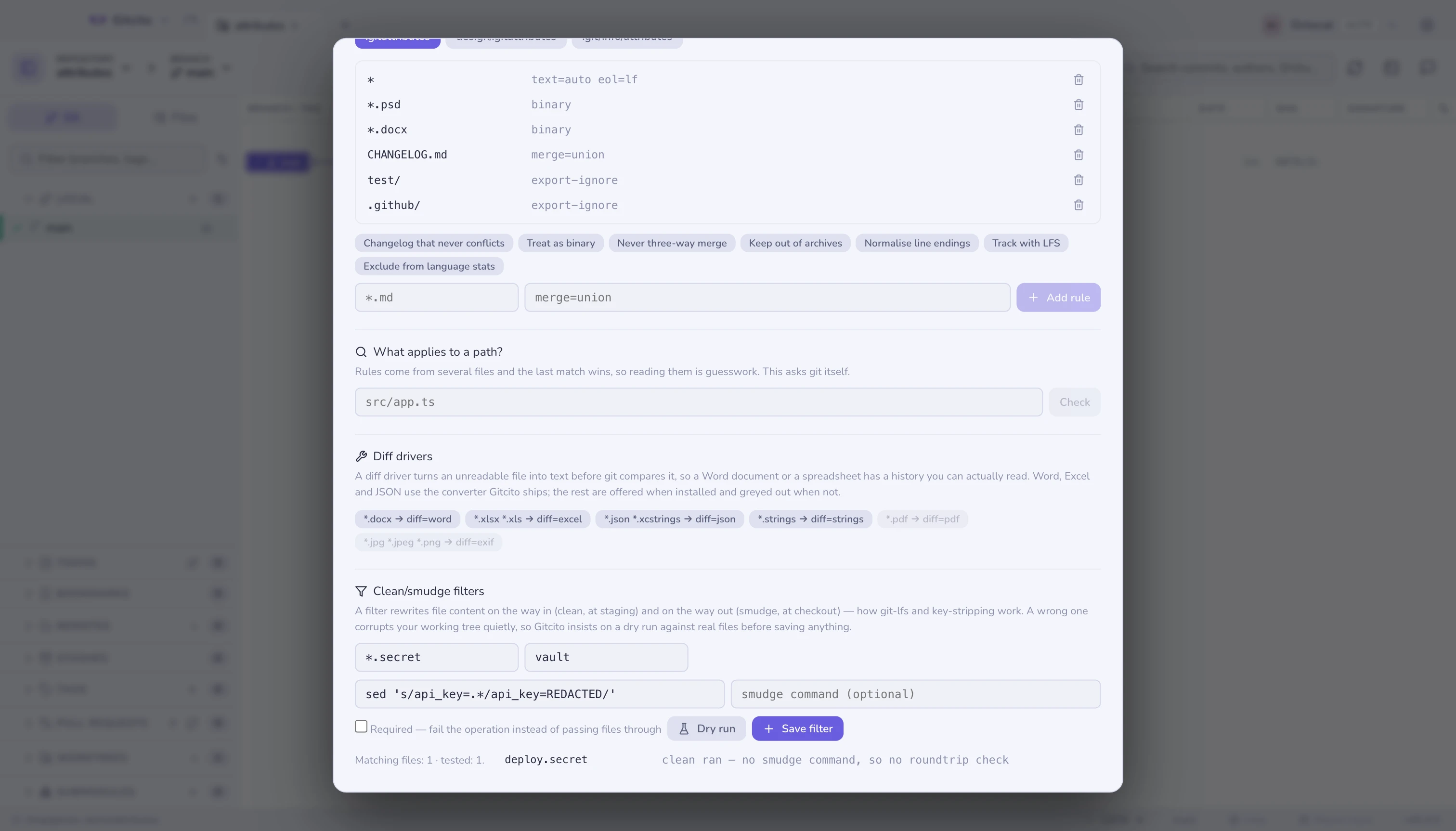
What the rules do
| Attribute | Fixes |
|---|---|
text=auto eol=lf |
Line endings that flip depending on who checked out the file |
binary |
Git trying to diff or three-way merge a PSD, a DOCX, a compiled asset |
merge=union |
A changelog everyone appends to, and everyone conflicts on |
-merge |
Files where a three-way merge produces nonsense — lockfiles, generated code |
export-ignore |
CI config and fixtures shipped inside a release tarball |
diff=<driver> |
Unreadable diffs for formats that are readable, given a converter |
filter=lfs |
Large files stored via LFS |
linguist-vendored |
Vendored code counted as yours in language statistics |
binary is shorthand for -diff -merge -text, which is three answers to "stop
guessing about this file" in one word.
Editing
The presets fill in a pattern and its attributes; edit the pattern before adding
— CHANGELOG.md is a suggestion, not a rule about your project.
Edits are surgical. Adding a rule for a pattern that already has one rewrites that line where it sits, rather than appending a second rule that wins by being later. Comments in the file survive untouched, because the "why" beside a rule is usually worth more than the rule.
Every save is a normal Gitcito action: it toasts, and Undo restores the file exactly as it was.
A repository can have several attributes files. One at the root, one in any
subdirectory, and a private .git/info/attributes that is never committed and
applies only on your machine — the right place for a rule that is about you, not
about the project. Gitcito lists them all and says which is which.
What applies to a path?
Rules come from several files, the more specific one wins, and reading them to
work out the answer is guesswork. What applies to a path? runs
git check-attr and shows what git itself concludes — the only answer that
counts.
Diff drivers: making a Word document readable
A .docx is a zip. A .pdf is a compressed object graph. Git diffs them as
what they are — noise — so a document's history is unreadable even though the
document is not.
A diff driver fixes this with textconv: a command that turns the file into
text for diffing only. The file in your working tree is untouched; git just
compares the converted text.
Two halves, and both are needed:
diff.<name>.textconvin git config — the converter command.*.docx diff=<name>in.gitattributes— which files it applies to.
The buttons here do both at once. For Word, Excel, JSON and .strings, Gitcito
ships the converter itself — the same parsing its previews use, exposed as a
small gitcito-textconv command inside the app — so those four work with
nothing installed. The rest still need a real tool on your PATH: Gitcito checks
and greys out what is missing rather than writing a driver that fails at the
first diff.
| Driver | Needs | Gives you |
|---|---|---|
word |
nothing — ships with Gitcito | Prose diffs of .docx |
excel |
nothing — ships with Gitcito | Row diffs (CSV per sheet) of .xlsx/.xls |
json |
nothing — ships with Gitcito | Key-sorted, stable JSON diffs |
strings |
nothing — ships with Gitcito | Line diffs of a UTF-16 .strings, which git calls binary |
pdf |
pdftotext (poppler) |
Text diffs of .pdf |
exif |
exiftool |
What changed about an image, when the pixels are opaque |
The one that bites iOS projects
Localizable.strings is UTF-16 for most of Xcode's history, and UTF-16 is full
of NUL bytes, so git calls it binary and shows nothing:
diff --git a/Localizable.strings b/Localizable.strings
Binary files a/Localizable.strings and b/Localizable.strings differ
That is the one file where seeing which string somebody moved matters most. The
strings driver decodes it for diffing — reading the byte-order mark rather
than assuming, so a modern UTF-8 .strings passes through unharmed instead of
turning into mojibake.
String Catalogs (.xcstrings, Xcode 15 and later) are JSON, and the json
driver covers them: it sorts keys, so a translation added at the top stops
rewriting the whole file in the diff.
The bundled converter's limits, stated plainly: .doc (the old binary Word
format) is not understood, only .docx; PDF is not covered — Gitcito previews
PDFs with the browser's viewer and has no text extractor to reuse; and each
diff of a document pays a short converter start-up cost. Setting
git config diff.<name>.cachetextconv true makes git cache the output per blob.
The converter half lives in your config, not in the repository — git will
not run commands a clone hands you, which is a security property worth keeping.
The bundled drivers also point at your Gitcito install path, so a teammate
who clones gets the diff=word rule and, until they wire their own converter
(Gitcito or otherwise), the old unreadable diff. Say so in your README.
Clean/smudge filters — with a dry run first
A filter rewrites content on its way in and out of the repository: clean
runs at staging (working tree → repo), smudge at checkout (repo → working
tree). It is how git-lfs works, and how teams strip credentials or generated
noise from what gets committed.
It is also the most dangerous thing .gitattributes can point at: a filter
runs on every checkout of every matching file, and a wrong one corrupts
your working tree quietly. So Gitcito refuses to be a text box here. Configuring
a filter goes through a dry run against real matching files in your
repository:
- The
cleancommand runs on a copy of each matching file (up to five) — nothing in the repository or its config is touched. - If a
smudgecommand is given, it runs on the cleaned output and the result is compared byte-for-byte with the original — the roundtrip check. A filter that does not roundtrip means checking out will not restore what you had. - Only after a dry run on exactly the values you are saving does the save button arm. A dry run that failed — command error, nothing matched, or a differing roundtrip — can still be saved, but only through an explicit warning that says what can be lost.
Saving writes filter.<name>.clean/smudge to your local git config and the
filter=<name> rule to the attributes file, and leaves an undo entry that
restores whatever the config held before. The required toggle sets
filter.<name>.required, which makes git fail an operation instead of silently
passing files through when the filter breaks.
The limits, stated plainly: the dry run samples up to five matching files of at
most 5 MB each, with a 10-second timeout per command — a filter that behaves on
the sample can still misbehave on a file the sample missed. The commands live in
your config, so a teammate who clones gets the filter=<name> rule but not the
commands; without them (and without required) their files pass through
unchanged.
Limits worth knowing
text=autochanges what gets committed, normalising line endings on the way in. On an existing repository, add it and then rungit add --renormalize .deliberately, in one commit of its own.- Attributes do not apply retroactively. Marking a file
binarytoday does not change how its past diffs were stored; it changes how git treats it from now on. - Rules only take effect where the file is visible. A rule in
design/.gitattributessays nothing aboutsrc/. - Gitcito writes whole files, so a hand-formatted file comes back with its
formatting — but a rule Gitcito rewrites is reformatted to git's canonical
pattern attr attrspacing.
See also: LFS & sparse checkout · Bundles & archives · Merge options · Hooks