
SSH keys
Settings → Security → SSH keys.
Why this exists next to the tokens
Gitcito authenticates two different things, and people reasonably assume they are one:
| Authenticated by | |
|---|---|
| The host API — repos, PRs, issues, CI checks | Your token |
Git transport over https:// |
Your token, injected into the URL |
Git transport over git@… |
Your SSH key, via the system ssh |
A remote like git@github.com:me/api.git never touches the token. Git hands the
connection to ssh, which has never heard of a personal access token. That is
not an edge case — it is what you get when a colleague set the repo up, when a
.gitmodules uses git@ URLs, when your company disables HTTPS auth, or when
the host is a self-managed GitLab.
When that goes wrong, ssh says Permission denied (publickey) and nothing else.
Technically true, useless as advice.
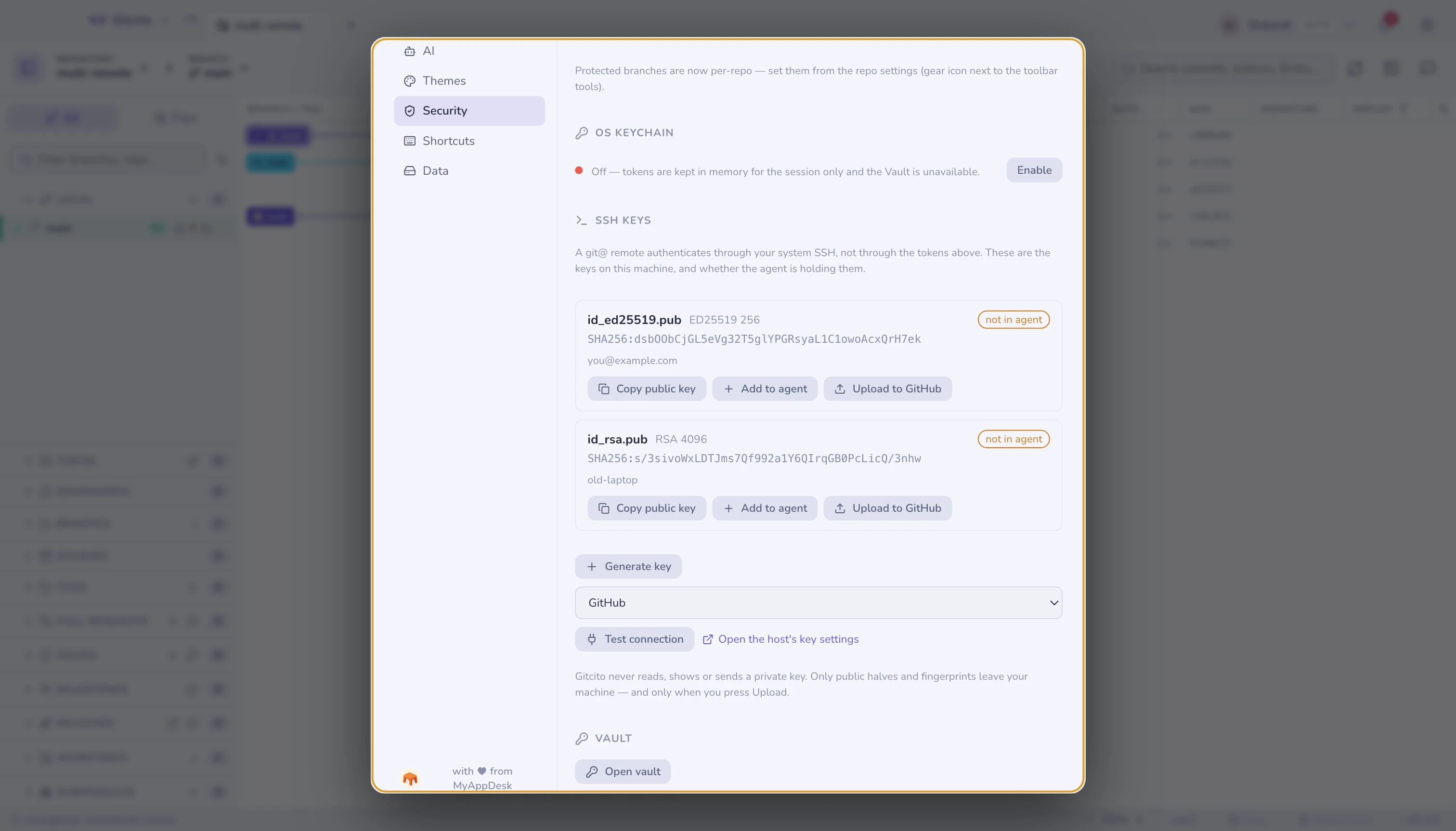
What the section tells you
Each key found in ~/.ssh shows its type, size, fingerprint and comment, plus
the one fact that explains most sudden failures:
in agent / not in agent. A key the agent is not holding cannot authenticate anything, and the agent forgets its contents on reboot unless the OS was told otherwise. "It worked yesterday" is usually this.
What you can do here
| Action | What it runs |
|---|---|
| Copy public key | Puts the .pub line on the clipboard, ready to paste into any host |
| Add to agent | ssh-add (with --apple-use-keychain on macOS, so it survives a reboot) |
| Upload to GitHub | POST /user/keys with this profile's token |
| Generate key | ssh-keygen -t ed25519, commented with your git email |
| Test connection | ssh -T git@<host>, translated into a sentence |
Test connection exists because ssh's own answer is misleading: GitHub authenticates you successfully and then exits with a failure code, since it does not offer a shell. Gitcito reads the message rather than the exit code, and shows the raw output underneath so you can check its reading.
The limits, stated plainly
- Upload is GitHub-only. GitLab, Bitbucket and Azure DevOps get Copy public key and a link straight to their key settings page. Registering keys on the other three is not implemented, and the button does not pretend otherwise.
- Generating never overwrites. A name already present in
~/.sshis refused. Overwriting a private key silently revokes your access to everything that trusts it, and no confirmation dialog makes that recoverable. - Passphrases are not stored by Gitcito. You type one when generating or
when adding to the agent; it is passed to
ssh-keygen/ssh-addand dropped. Persisting it across reboots is the OS keychain's job, viassh-add. - No
~/.ssh/configediting, no host aliases, no per-repo key selection. Those live in your ssh config, and Gitcito leaves that file alone.
What never leaves your machine
Gitcito never reads, displays or transmits a private key. The section lists public halves and fingerprints. The only thing that is ever sent anywhere is the public key you explicitly press Upload on — and that goes to GitHub, under your own token, after a confirmation that names the fingerprint.
See also: Security & secrets · Hosting & pull requests