
Stacked branches
A stack is a chain of branches where each one builds on the one below:
main → api → ui. Reviewing three small PRs beats reviewing one enormous one.
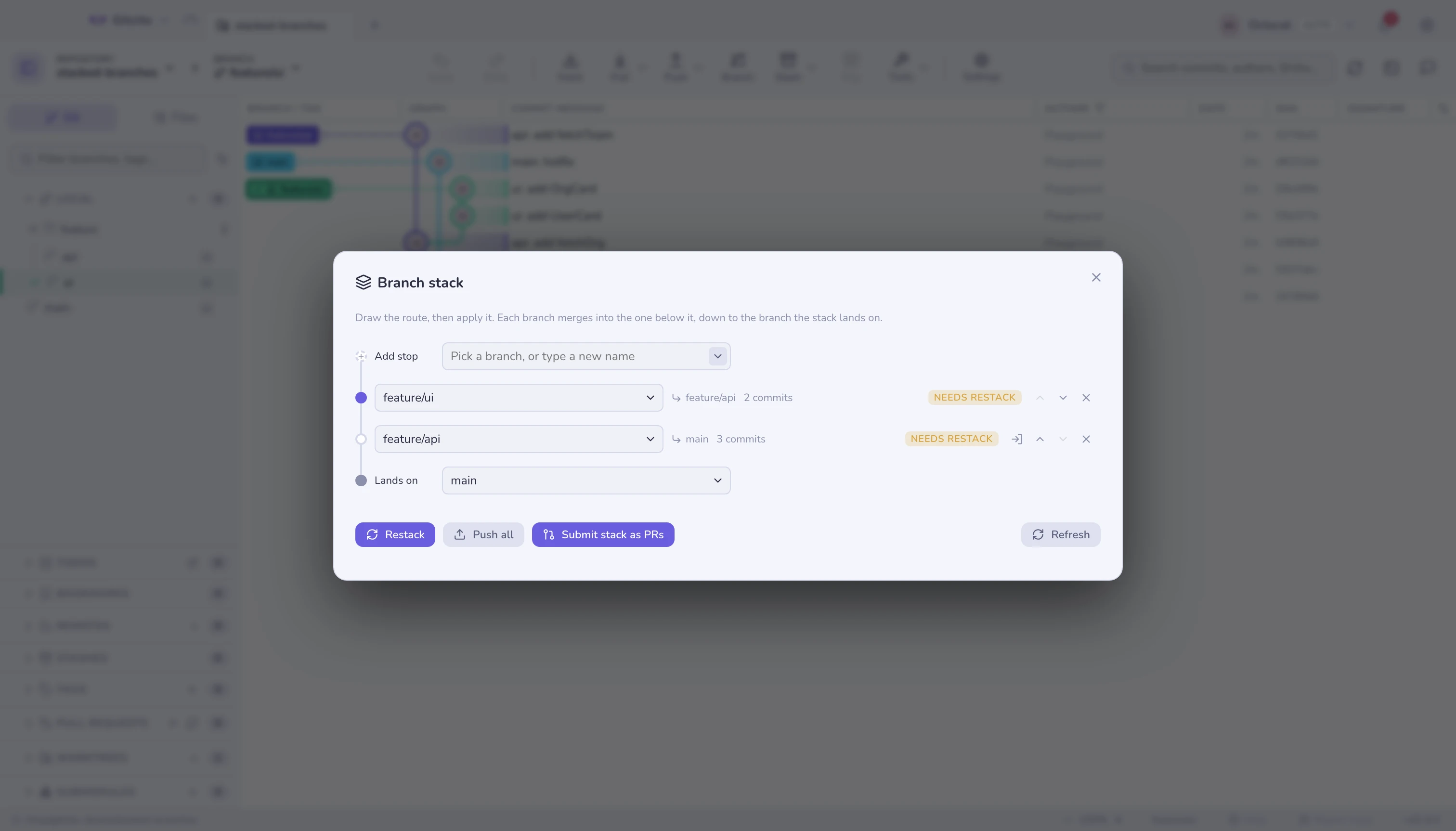
Gitcito draws it as a route: a start branch at the top, then one stop per level. Each stop's PR targets the stop above it, and the first stop lands on the start branch. A stop shows its own commit count, whether it needs a restack, and its PR number once submitted.
Editing the route
Nothing runs until you press Apply. Picking a branch, moving a stop, taking one off the route — all of it edits a list on screen. The real operation rebases branches and checks them out, which is not something an exploratory click should do. When the route reads right, Apply route performs it as one undoable step; Discard puts the drawing back to what the repository actually says.
The route is drawn in merge order: the branch on top merges into the one below it, down to the branch the stack lands on.
| Control | What it does |
|---|---|
| The Start field | Where the stack lands. Change it and the whole chain re-links onto the new branch and replays. |
| A stop's field | Swaps which branch occupies that position. The branch that leaves is untracked, never deleted. |
| ↑ / ↓ | Moves a stop one place along the route. |
| ✕ | Takes the stop off the route; its neighbours join up. |
| Add stop | Pick a branch you already have and it joins the top of the route — or type a name that does not exist yet, and Apply creates it on the tip of the stop below. |
| The arrow button | Checks that stop out. This one is immediate — it is a checkout, not a route edit. |
Every field is a typeahead: type to filter, ↑/↓ and Enter to pick, and anything
you type that is not in the list still counts — so a remote-tracking ref like
origin/main works as a start branch.
Each of those edits is the same operation underneath: the whole route, handed back at once. That is why one gesture is one undo entry (⌘Z) rather than a trail of half-applied link changes.
What a route edit costs
Anything that changes the order — a swap, a move, a different start — replays the chain: each stop's own commits are rebased onto its new base. So it can conflict — two stops that touch the same lines cannot swap without a human. When that happens nothing happens: the whole edit is rolled back, tips, parent links and the half-finished rebase alike, and Gitcito names the two stops that clash. A dropdown you nudged should not strand you mid-rebase.
Restack is the other half of that bargain. It is a rebase you asked for by name, so it does stop at the conflict and hand you the conflict view — which is also the way to make a reorder that Gitcito refused: resolve there, then move the stop.
Undo replays the previous route. It does not resurrect the old commits, because the new ones are the same work with different parents.
Push all
Push all pushes every level with --force-with-lease and stops there — gh stack push without opening anything. Submit stack as PRs below does the
same push and then the PR work; use Push all when you want the branches on
the remote but are not ready for review.
Submit the stack as chained PRs
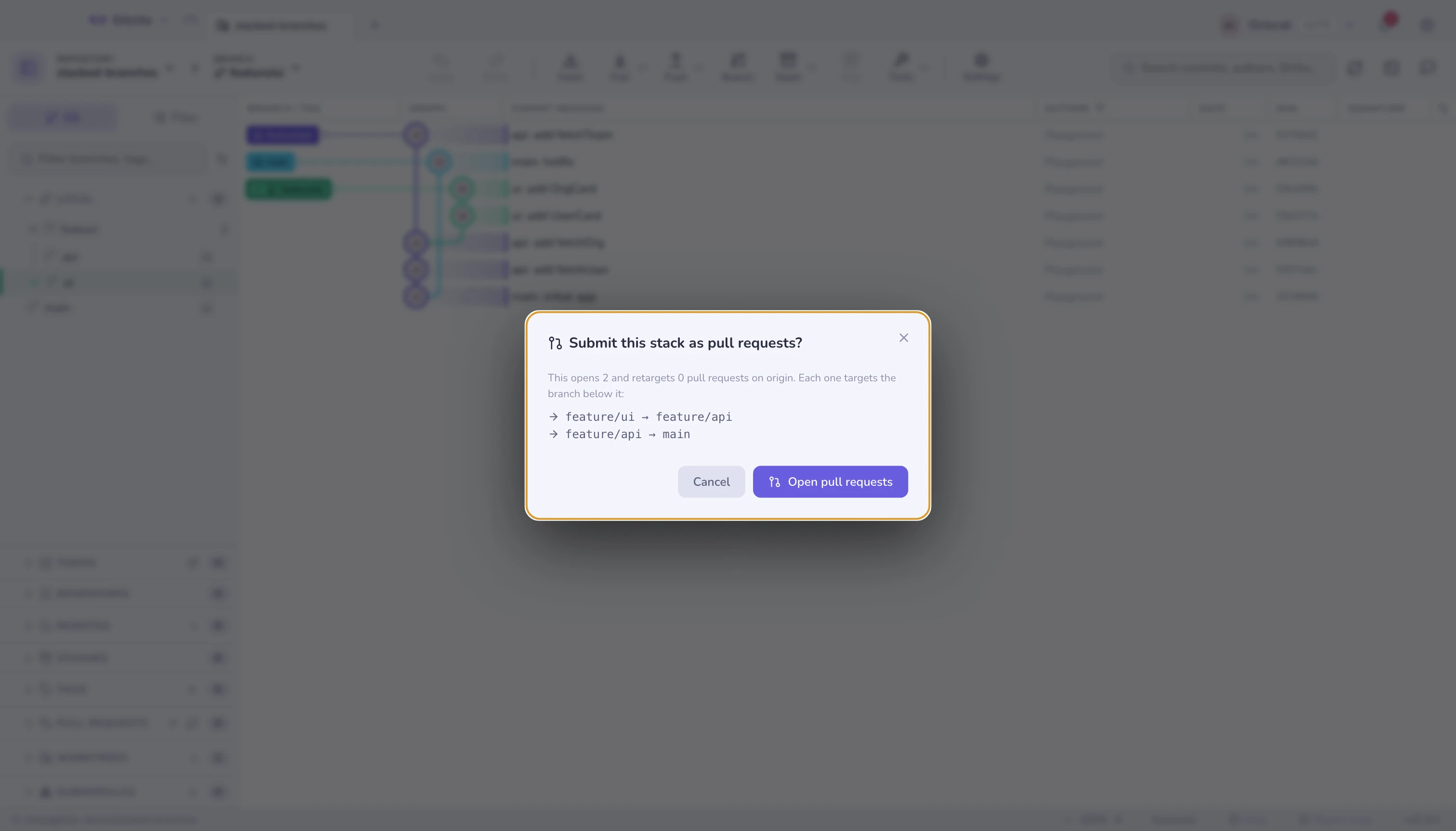
Submit stack as PRs opens a screen of its own, because opening pull requests
is public and awkward to take back. It shows the plan first — how many it will
open, how many it will retarget, on which remote, and the branch → base line
for each — then runs in place, naming each step as it goes, and finishes on the
links: every pull request it touched, and the stack itself where GitHub made
one.
Behind that button it does in one click what stacking tools charge for:
- Pushes every level with
--force-with-lease(fresh branches tolerate it, restacked ones need it). - Opens a PR for every level that lacks one — each based on its parent
branch, not on
main, so every review shows only its own commits. Title and description come from the level's own commits. - Retargets any existing PR whose base has drifted.
- Writes a stack navigation section into every PR body, so a reviewer on any level can see the whole chain and where this PR sits in it. That section is what makes the chain visible on GitHub, which has no notion of a stack — the bases alone only show up one PR at a time.
When it finishes, the screen lists what happened — click any row to open that pull request.
The action is idempotent: press it after every restack, new level or merged PR and it converges — nothing is duplicated, only what drifted is touched.
When the bottom PR has merged, the same button cleans up after it: the merged level's child is reparented onto the trunk, the level is untracked, its local branch deleted (safe — the trunk provably contains it), the chain restacked and every remaining PR retargeted. Merge bottom-up, press Submit, repeat.
On GitHub it also becomes a real stack
Chained bases are what every host understands, and on GitLab, Bitbucket and Azure DevOps they are all there is. GitHub has more: since its stacked pull requests preview, a stack is an object on the server. Once the pull requests exist, Gitcito registers them as one — bottom to top — and you get the stack map in the PR UI, a cascading rebase run server-side, and a merge on the top PR that lands every unmerged level below it.
If the repository is not in that preview, or the token cannot manage stacks, the call is skipped without comment: the chain and its navigation section stand on their own, exactly as they do on the other hosts.
Restack
When a lower branch changes — you addressed review comments on api — every
branch above it is now built on the wrong base. Restack cascade-rebases the
whole chain with rebase --onto, so a parent rewrite does not duplicate commits
into its children. After a restack, press Submit again: it force-pushes the
rewritten levels and the PRs update in place.
Limits
- Submission is GitHub-only for now (creation works on all four hosts, but retargeting and body updates need the GitHub API).
- The merged-bottom cleanup sees merge and rebase merges by ancestry, and squash merges by asking GitHub whether the branch's PR landed — so with a GitHub token every merge style is cleaned up. On other hosts, or without a token, a squash-merged level still needs a manual untrack. Fetch first, too — the ancestry check reads the trunk as of your last fetch.
- The stack section in a PR body is maintained between hidden markers — your own description above it is preserved.
- Reordering and changing the start rewrite history on every stop they touch. The The branches are yours and unpushed stops cost nothing, but a stop that is already under review gets a force-push on the next submit.
- A stop moves one place at a time. Two swaps are two rebases, and stopping halfway is a legible state; a drag that lands three places away is not.
- A stop gets rebased, so the branch the stack lands on is never also a stop,
and neither is a protected branch —
mainandmasterunless you changed the list. Both are refused rather than quietly rewriting shared history. - Submit asks the remote which branches actually arrived before it opens anything, and names the ones that did not. GitHub answers a missing head with a bare "Validation Failed", which is worth nobody's afternoon. The branch the stack lands on is checked too — if it is still only local, Submit offers to push it and carry on rather than failing on the bottom PR.
Where the links live
Parent links are stored in git config, so they travel with the repository and survive a reclone. Nothing lives in a service.
See also: Interactive rebase · Hosting & pull requests