
Repository maintenance
Git never tells you what a repository costs. It keeps working whatever state its object database is in, so the first sign of trouble is usually a clone that crawls or a laptop with no disk left — long after the point where a single command would have fixed it.
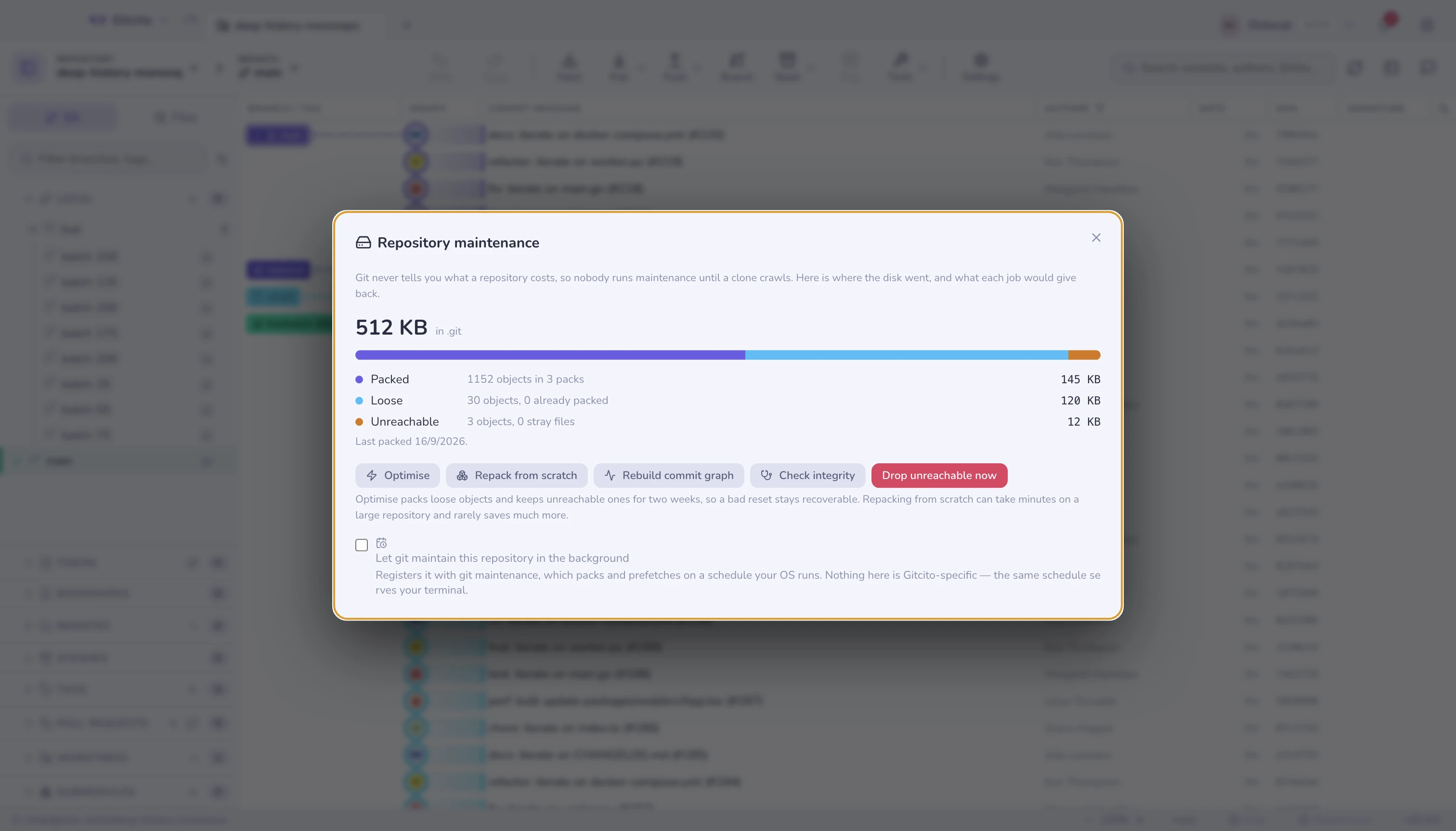
This panel is the missing readout: where the space went, how much of it is reclaimable, and what each job does before you run it.
⌘K → Repository maintenance.
Reading the numbers
Everything comes from git count-objects -v and a real reachability walk —
nothing is estimated.
| Row | What it is | Why it grows |
|---|---|---|
| Packed | Objects inside packfiles, compressed and deltified | This is the healthy state |
| Loose | One file per object, barely compressed | Every commit, every fetch writes these |
| Unreachable | Objects nothing points at any more | Discarded commits, amended messages, abandoned rebases |
The count next to Loose — "n objects, m already packed" — is the one worth
watching. Those m are stored twice over: once loose, once inside a pack. They
are pure duplication, and git gc is what collapses them.
Unreachable is not garbage yet. Those objects are how git reflog brings
back a commit you reset away. Git keeps them for two weeks on purpose.
The jobs
| Button | Runs | Cost |
|---|---|---|
| Optimise | git gc |
Seconds to a minute. The right answer nearly always |
| Repack from scratch | git gc --aggressive |
Minutes on a large repository. Recomputes every delta |
| Rebuild commit graph | git commit-graph write --reachable |
Fast. Makes log and graph walks noticeably quicker |
| Check integrity | git fsck --dangling |
Slow on a big repository, changes nothing |
| Drop unreachable now | git gc --prune=now |
Destroys the reflog's safety net |
Optimise is the one to reach for. It packs loose objects, drops what has been unreachable for over two weeks, and leaves recent history recoverable.
Repack from scratch is oversold. It throws away every existing delta and recomputes from nothing, which takes minutes and usually saves a few percent over a plain gc. Worth doing once after importing a huge history; not worth doing routinely.
Drop unreachable now asks first, and the confirmation says how many objects and how much space. After it, a commit you reset away an hour ago is unrecoverable — the reflog entry may still be listed, but the object behind it is gone.
Check integrity
git fsck verifies that every object referenced by another object is actually
present and internally consistent.
- Dangling objects are normal. They are the unreachable ones, listed by name. A repository with hundreds of them after a rebase is healthy.
- Missing objects are damage — a truncated write, a bad disk, an interrupted transfer. If any appear, do not repack: repacking a damaged database can turn a recoverable problem into a permanent one. Clone a good copy from your remote and move your unpushed branches over with a bundle.
Background maintenance
The checkbox registers the repository with git maintenance, which packs
and prefetches on a schedule your operating system runs (launchd, systemd or
Task Scheduler).
Nothing here is Gitcito-specific: the same schedule serves your terminal, and
git maintenance unregister undoes it from anywhere. Unticking the box does
exactly that, and leaves the schedule in place for whatever other repositories
are registered.
Limits worth knowing
- The unreachable count needs a full reachability walk, so opening the panel on a very large repository takes a moment. That is the honest number, not an estimate.
- Sizes are what the disk gives up, not the length of the content. A loose object of 400 bytes still occupies a 4 KB block, which is why a thousand of them cost megabytes — and why packing them is worth doing.
- A worktree or submodule has its own
.git, so the size shown is this repository's alone. - Maintenance cannot shrink history. If a 400 MB blob is in a commit, it is reachable, and gc will keep it forever — that is removing a file from history, a different and much more disruptive operation.
- Gitcito never runs gc behind your back. Git's own
gc --autostill may, as it always has; if one fails it leaves a note in.git/gc.log, which this panel surfaces.
See also: Remove a file from history · Bundles & archives · Recovery