
Repository rules (.gitcito.json)
Every project carries rules nobody can deduce from the code. Never push
straight to release/*. Commit scopes are api, web, infra and nothing
else. You need Node 20, the submodules checked out, and a .env copied from
.env.example before anything runs. Those live in a README nobody rereads, in
a CI failure, or in whoever has been here longest.
.gitcito.json is where a repository writes them down so the tool can act on
them. It sits at the repository root, is committed like any other file, and so
travels with the clone: everyone who opens the project gets the same rules, and
a newcomer gets them on day one instead of on their first rejected push.
The file is entirely optional. A repository without one behaves exactly as it always did.
You do not have to write it by hand: repository chat is given this file's schema, so add ticket links for JIRA-1234 or protect the release branches comes back as a reviewable file action.
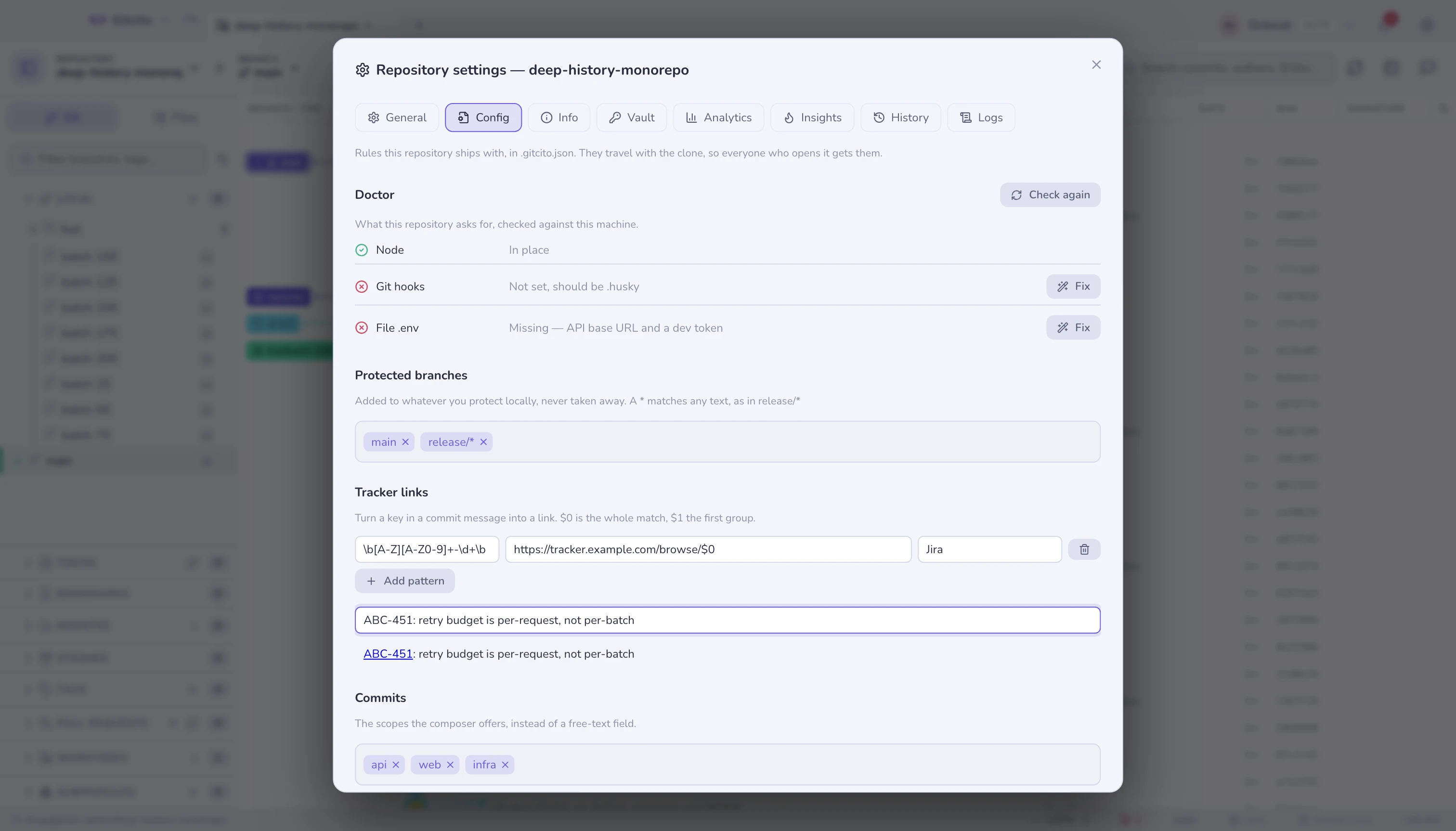
Where to edit it
The gear next to the toolbar tools → Config. That editor writes the file into your working tree; it is not saved anywhere else, so commit it to share the rules with the team.
If the repository has none, Read the repository proposes one from what is
already there — a .nvmrc or engines.node, a .gitmodules, filter=lfs in
.gitattributes, an .env.example with no .env next to it, the branches you
already protect locally, and the commit scopes the last 500 subjects have been
using. Nothing is written until you save. From a terminal, gitcito config init
does the same thing (see the command line).
What the file can say
{
  "version": 1,
  "protect": ["main", "release/*"],
  "links": {
    "tickets": [
      { "match": "\\b[A-Z][A-Z0-9]+-\\d+\\b", "url": "https://tracker.example.com/browse/$0", "label": "Jira" }
    ]
  },
  "commit": {
    "scopes": ["api", "web", "infra"],
    "ticketFromBranch": true,
    "trailers": ["Refs: {ticket}"]
  },
  "requires": {
    "node": ">=20",
    "hooksPath": ".husky",
    "submodules": true,
    "lfs": true,
    "files": [{ "path": ".env", "from": ".env.example", "why": "API base URL and a dev token" }]
  },
  "checklist": {
    "push": ["Run the integration suite against staging"]
  }
}
| Field | What it does |
|---|---|
version |
Must be 1. A file from a newer schema is ignored whole, rather than guessed at. |
protect |
Branch names, * matching any run of characters. Added to the branches you protect locally — see protected branches. |
links.tickets |
A regular expression and a URL template. $0 is the whole match, $1…$9 its groups. Matches in commit subjects and bodies become links. |
commit.scopes |
The scopes the composer offers, instead of a free-text field. Declaring them also turns an unknown scope from style advice into an error in gitcito commit-check. |
commit.ticketFromBranch |
Fills the ticket key in from the branch name (feature/ABC-123-thing → ABC-123) — but only into an empty composer, never over something you are typing. |
commit.trailers |
Lines appended to the commit body. {ticket} and {branch} are filled in; a line whose placeholder has nothing to fill it is dropped rather than written half-empty. |
requires.* |
What a working clone needs. Each entry becomes a doctor row, below. |
checklist.push |
Free text shown once a session, before the first push. |
The doctor
requires is the part that answers "I cloned it and it does not run." Gitcito
checks it when you open the repository and shows a stethoscope chip in the
status bar when something is off. Clicking the chip opens the Config tab at the
doctor rows; Check again re-runs them.
| Check | Passes when | Offers to fix by |
|---|---|---|
node |
The node on your PATH satisfies the spec |
— |
submodules |
No submodule is missing a checkout | git submodule update --init --recursive |
lfs |
git-lfs is installed and tracked files are real content, not pointer text | git lfs pull |
hooksPath |
core.hooksPath matches the declared path |
setting core.hooksPath |
files |
The file exists | copying it from from, if that exists |
Two deliberate limits. A warning never means "broken" — it means the doctor
could not determine something (an unparseable Node spec passes rather than
inventing a failure you cannot act on), and warnings do not fail
gitcito doctor in CI. And a repair is never something the file supplied: the
set above is the whole set, closed at compile time. The config hands it a value
— a path to copy, a value for core.hooksPath — and never a command.
Copying a file never overwrites: the file being absent is the entire reason the row is there.
Commits
With commit.scopes declared, the composer's scope button offers that list
rather than a free-text field — the difference between feat(renderer) and
feat(rendererr). ticketFromBranch and trailers fill in the parts of a
message that are mechanical, and links.tickets turns the keys back into links
wherever a commit is displayed.
The same rules apply outside the window: gitcito commit-check reads this file,
so a commit-msg hook and CI enforce exactly what the composer suggests. See
the command line and committing.
The push checklist
checklist.push is shown as a confirmation before the first push of a session,
one line per item. It is the place for the thing that is genuinely a judgement
call — has anyone told support about this? — because Gitcito never checks
these for you. They are reminders, not gates: read them and push, or cancel.
Shown once per repository per session, because a dialog on every push is a
dialog nobody reads.
Why it cannot hurt you
The file arrives with the repository, which means it arrives from whoever wrote the repository. It is treated as untrusted content, no different from a commit message:
- Nothing in it runs. There is no field that holds a command, and the doctor's repairs are a fixed list.
- It can only add restrictions.
protectis a union with your local list — a repository can protect more than you chose to, never talk you out of protecting something. No field switches a guard off. - Paths cannot leave the repository. Absolute paths,
..,~, drive letters and anything touching.gitare rejected, and checked again at the point a string becomes a real path. - Links must be
http(s). Nothing else is handed to the system's URL opener. - Everything is capped — list lengths, string lengths, pattern lengths — so a hostile repository cannot paste a wall of text into a dialog or a thousand chips into a panel.
A bad field is dropped, not fatal. The rest of the file still applies, and what
was dropped is listed under Ignored by Gitcito in the Config tab with the
reason. The one exception is invalid JSON or an unknown version, where there
is nothing to salvage.
What it deliberately does not do
- No commands, no scripts, no hooks. That is what hooks are for, and they are a decision you make per clone.
- No per-branch or per-user rules. One file, one set of rules.
- It does not replace CI. The checklist is text; the doctor checks the environment, not your work.
- It cannot weaken anything. Every guard Gitcito has is still yours to set.
See also: Per-repository settings · The command line · Committing · Hooks & .gitignore