
Code TODOs
A TODO is a promise someone made to themselves and then lost. It is written where the problem is, which is exactly where nobody looks again, and by the time it matters the person who wrote it has changed teams. Grep finds them, and a thousand lines of grep output is the same as not finding them.
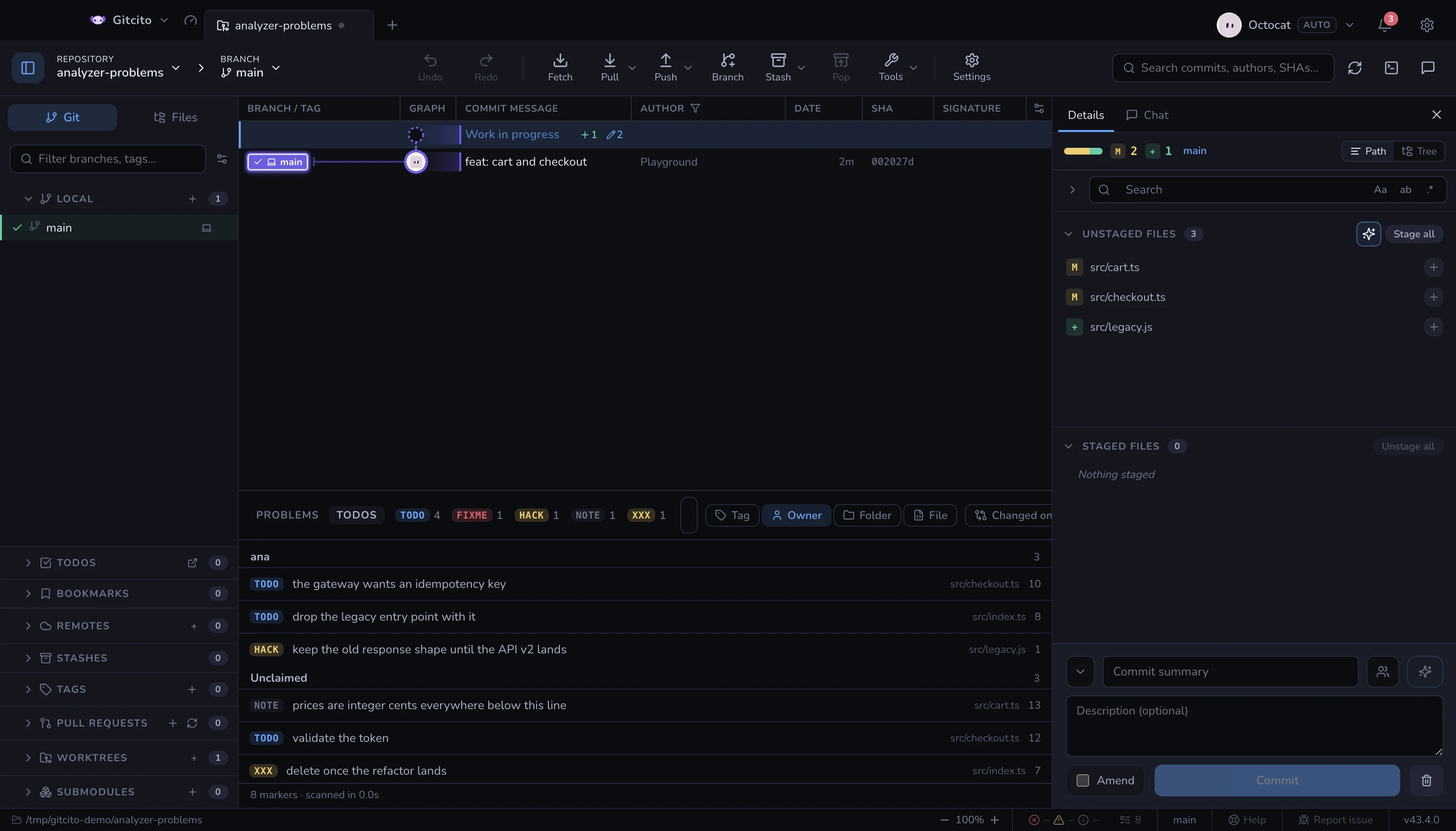
The TODOs tab of the analyzer dock reads them all and then does the thing
grep cannot: it groups them. Open the dock from the status bar or the command
palette (TODOs in the code) and switch to the second tab.
The status bar counts the markers beside the analyzers' errors and warnings; clicking that counter opens this tab.
What counts as a marker
A tag, in a comment, in a file Git tracks or would track:
| Written | Read as |
|---|---|
// TODO: ship it |
tag TODO, no owner |
//todo ship it |
the same — the colon and the space are optional |
# todo ship it |
the same — case does not matter, nor does the language |
/* TODO(cgm): ship it */ |
tag TODO, owner cgm |
-- TODO (CGM) ship it |
the same owner: cgm, (CGM) and [cgm] are one person |
<!-- TODO: @cgm ship it --> |
the same again |
The tags are TODO, FIXME, BUG, HACK, XXX, NOTE, OPTIMIZE,
REVIEW, REFACTOR, DEPRECATED, QUESTION, IDEA, WIP and TEMP. The
first four are coloured, because "this is broken" and "this is an idea I had"
should not look alike in a list.
The tag has to sit behind a comment leader — //, #, --, ;, %, /*,
*, <!--, """. Nothing else counts: todo = [l for l in lines] is code, and
a panel that lists a variable assignment as debt is a panel nobody trusts twice.
The same rule keeps a function called reviewNotes out of the list.
Grouping is the feature
Four axes, one click each:
| Group by | Answers |
|---|---|
| Tag | What kind of debt is this repository carrying? |
| Owner | What did each person leave behind — and what is in the unclaimed pile? |
| Folder | Which corner of the tree is rotting? |
| File | The plain list, when you already know where you are going. |
Unclaimed is a real group, not a leftover: markers nobody put a name on are the ones that never get picked up, and seeing them counted is the point.
The tag chips along the top filter the list; so does clicking an owner badge on
a row, and so does the search box, which matches the message, the file, the tag
and the owner. Changed only narrows to files you have edited but not
committed — the last check before a push, when a // FIXME you left an hour ago
is about to become permanent.
Clicking a row opens the file at the line.
What it does not do
- It reads, it never writes. There is no "mark done" — the way to close a TODO is to delete the line and commit that. For a checklist Gitcito keeps for you, see todos, which is a different thing entirely: private notes that live in the app, not in the source.
- Ignored files are skipped, along with
node_modules, whatever the tags inside them say. Untracked files are included: a marker written five minutes ago is the one most worth seeing. - It cannot tell a comment from a string. A line reading
const banner = "// TODO"is a marker as far as the scan is concerned. It has no parser for forty languages and does not pretend to. - The scan is a snapshot. Edit a file and the panel keeps the numbers it had until you scan again; the refresh button is the whole story.
- It stops at 5,000 markers. A repository past that has a debt problem no panel is going to solve.
Where it runs
One git grep over the working tree, which is why it takes milliseconds where
the Problems tab takes seconds: nothing is compiled, no toolchain
is involved, and the search skips binaries and ignored paths because Git already
knows which ones those are.