
The command line
Two kinds of question get asked from a terminal, and gitcito answers both.
The first is "show me this" — you are in a checkout, something needs looking at, and the app is the right place to look at it. Those invocations open a window, as close to the thing you asked about as Gitcito can get.
The second is "tell me now" — a hook, a CI job, or you, mid-pipe, wanting an answer and an exit code rather than a window. Those never launch the app at all: they print to stdout and get out of the way.
gitcito .                        # open this folder
gitcito blame src/api.ts -l 84   # …at that line's blame
gitcito doctor                   # no window: check the repo, exit 1 if it fails
Installing it
Command palette (⌘K) → Install 'gitcito' command in PATH. On
macOS it symlinks a small shim into /usr/local/bin or /opt/homebrew/bin,
asking for admin rights only if neither is writable by you. On Linux it goes to
~/.local/bin, which needs no rights at all. Run the same command again to
uninstall. Windows is not supported yet.
Then, optionally:
gitcito completions zsh >> ~/.zshrc # or bash, or fish
Opening things
| Command | Opens |
|---|---|
gitcito [path] |
The repository (default: the current directory) |
gitcito open <name> |
A repository by its tab name — gitcito open api |
gitcito diff |
The working changes |
gitcito graph |
The commit graph |
gitcito show <ref> |
One commit — HEAD~2, a tag, a short hash |
gitcito blame <file> |
Blame for a file; add -l 84 to land on a line |
gitcito search <query> |
Code search, with the query already typed |
gitcito stack, stash, reflog, conflicts, todos, chat, settings |
That panel |
gitcito ci, clean, bisect, absorb, snapshots, insights, terminal |
…and so on |
gitcito help verbs prints the full list. Three flags apply to all of them:
-n <name> sets the tab's display name, -g <group> puts it in a group tab
(creating the group if needed), and -l <n> picks a line.
Gitcito is single-instance: running gitcito while the app is open hands
the request to that window rather than launching a second copy. A path that is
already open — as a tab or inside a group — is focused, not duplicated. A
directory that is not a repository still opens, offering the "initialise
repository here" flow.
Answering in the terminal
These print and exit. No window opens, and the app does not need to be running.
gitcito status
Branch, tracking, ahead/behind, working tree, stashes, and — if the repository
ships one — the push checklist from .gitcito.json. Exits 1
when the working tree has conflicts, so gitcito status || echo blocked works.
gitcito doctor [--fix]
Runs the same checks the repository rules panel runs: the
Node version, submodules, LFS, core.hooksPath, required files. Exits 1 if
any check fails, which is the point — the rules a repository declares are
worth little if only the person with the GUI open ever sees them:
- run: gitcito doctor # in CI, before anything expensive
--fix applies the repairs the doctor knows how to make (initialise
submodules, lfs pull, set core.hooksPath, copy a file from its example)
and re-runs. It never runs a command the config supplied — the repair set is
closed.
Warnings do not fail the run. A warning means the doctor could not determine something, not that something is wrong, and failing builds on those would make the file too expensive to adopt.
gitcito commit-check [file]
Lints a commit message. With no argument it reads .git/COMMIT_EDITMSG; -m "…" checks a string. It knows what the repository declared: an unknown scope
is an error when .gitcito.json lists scopes, and only style advice when it
does not. Wire it into a hook:
# .husky/commit-msg
gitcito commit-check "$1"
gitcito config init | show | check
init reads the repository and proposes a .gitcito.json from what is
already there — .nvmrc, .gitmodules, an .env.example with no .env, the
commit scopes the history has been using. --dry-run prints instead of
writing. show prints the current file; check validates it and lists any
field that would be dropped.
gitcito repos [filter]
Every repository Gitcito knows about — open tabs first, then recents — with its
group. --paths prints bare paths, one per line, for scripting:
cd "$(gitcito repos --paths api | head -1)"
Gitcito as git's editor
gitcito editor install
sets core.editor and sequence.editor to gitcito --wait. From then on
git commit (without -m), git commit --amend, git tag -a and
git rebase -i open their file in Gitcito instead of vim, with a character
counter and the same commit-message hints the composer shows.
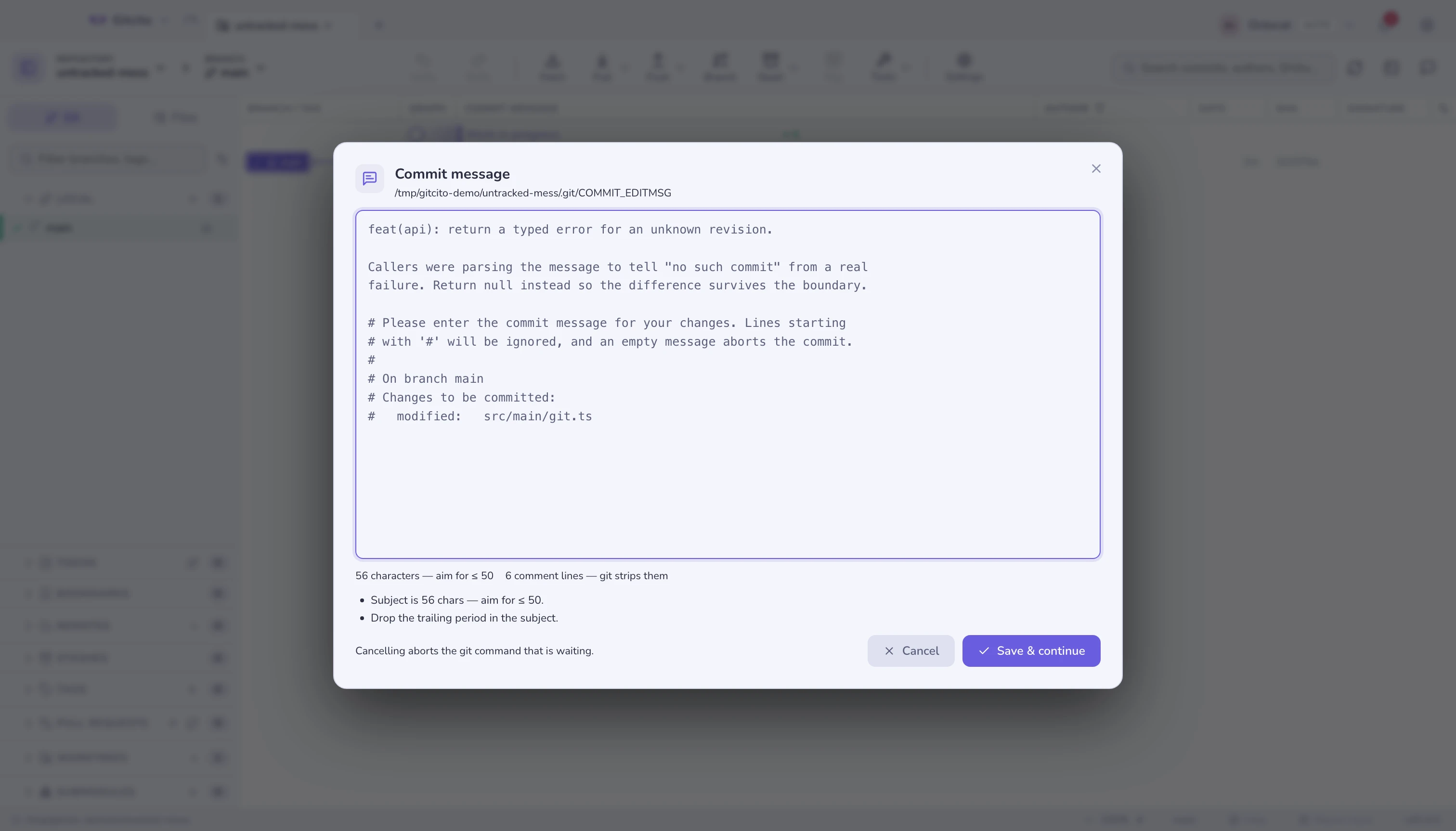
The important part is the word waiting: git is blocked on that dialog. So
- Save & continue writes the file back and git carries on.
- Cancel writes an empty file, which git reads as abort.
- Closing the dialog any other way — Escape, the backdrop, quitting Gitcito — counts as Cancel. A terminal that waits forever would be a far worse outcome than a commit you have to retype.
Add --local to scope it to one repository, and undo it with
gitcito editor uninstall.
What it will not do
- No repository is modified by a terminal verb.
doctor --fixis the one exception, and its repairs are a fixed list, not something a config file can extend. reposis read-only. The running app owns its settings file; the CLI reads it and never writes it.- A verb the installed app does not know is ignored, not refused — a newer shim against an older app still opens the repository.
- Windows has no shim yet. The verbs are all implemented; only the install path is missing.
See also: Workspaces, tabs & groups · Repository rules · Committing