
Cloning
New repository → Clone, or ⌘K → Clone. Paste a URL, or sign in to
GitHub, GitLab, Bitbucket or Azure DevOps and pick from your own repositories —
the token for the chosen profile is used for the clone and then
dropped, never written into .git/config.
Choose a parent folder and a name; the line under the fields shows exactly where the repository will land. A folder that already exists is refused rather than merged into.
Advanced — narrowing the clone
Everything under Advanced is off by default: leave it alone and you get an ordinary, complete clone. It earns its place on repositories where "complete" means twenty minutes and several gigabytes.
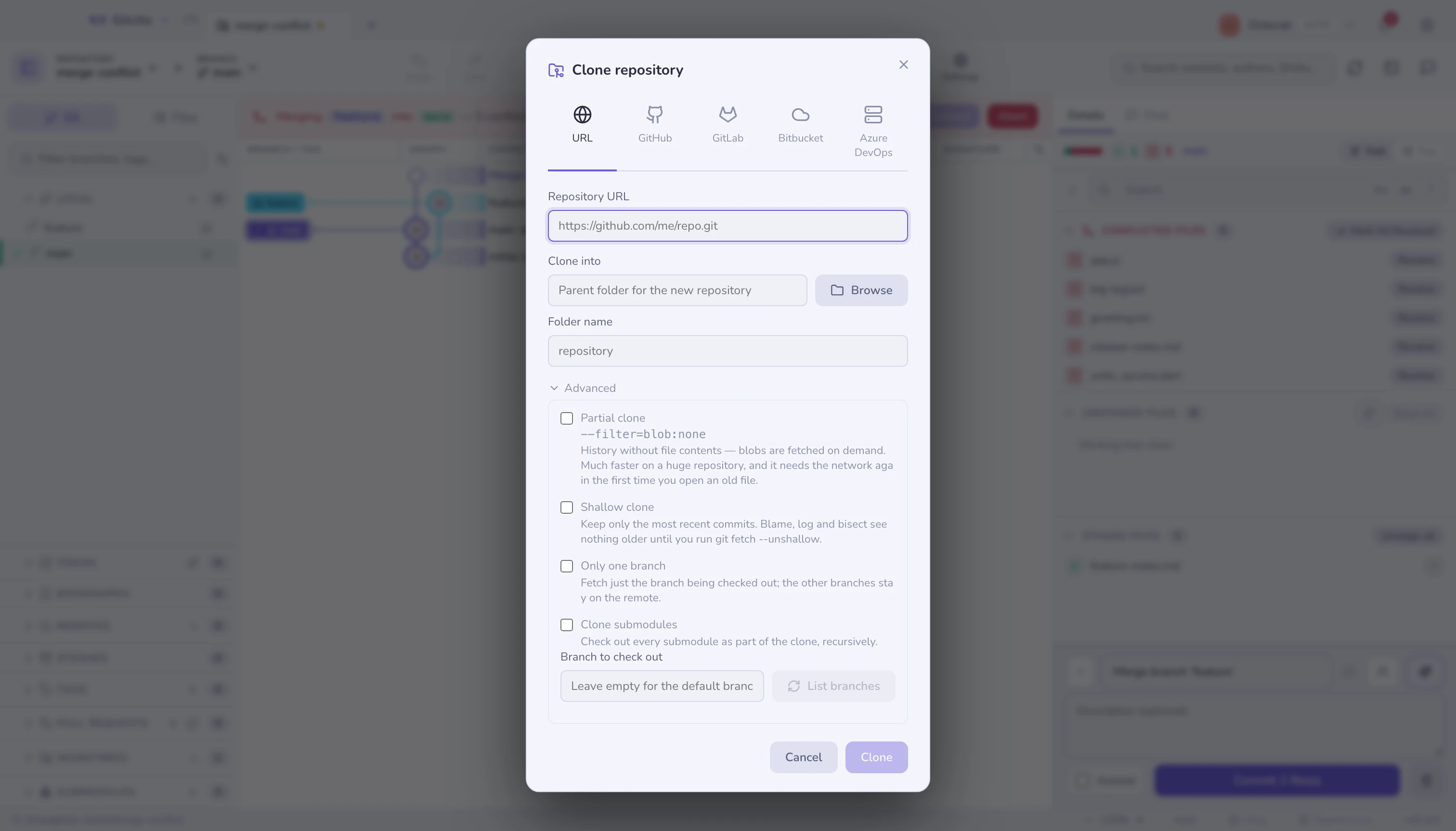
| Option | What git does | What it costs |
|---|---|---|
| Partial clone | --filter=blob:none |
Full history, no file contents. Blobs arrive on demand, so opening an old file needs the network. |
| Shallow clone | --depth=N |
Only the newest N commits exist. Blame, log, bisect and range-diff stop at the cut. |
| Only one branch | --single-branch |
The other branches stay on the remote until you fetch them. |
| Clone submodules | --recurse-submodules |
Every submodule is checked out too — more time now, no missing directories later. |
| Branch to check out | --branch <name> |
Starts on that branch instead of the remote's default. |
Partial before shallow. A partial clone keeps every commit — history stays
searchable, and only file contents are fetched lazily. A shallow clone actually
discards history: git log ends at the cut and blame cannot see past it. If you
are cloning a monorepo to work in, partial is usually the one you want.
Shallow is undoable: git fetch --unshallow in the terminal
fills the history back in.
Picking the branch
Type a branch name, or press List branches to ask the remote what it has
(git ls-remote --heads) and choose from a dropdown. That is one network round
trip, made only when you press the button — nothing is queried while you type.
If the listing fails — a private URL with no token yet, a typo, no network — the field stays a plain text box and the clone itself reports the real error.
Two notes on the flags
--depthimplies--single-branch. With a shallow clone, leaving Only one branch unchecked is what asks for the other branches back (--no-single-branch), which is why the hint under it changes.- Cloning a local folder normally ignores
--depthentirely, because git hardlinks the object store instead of fetching. Gitcito clones through afile://URL when you ask for a shallow copy of a local repository, so the depth you asked for is the depth you get.
Progress
The bar reports what git reports: counting, compressing, receiving, resolving, checking out. A stage that cannot report a total shows an indeterminate bar rather than a fake percentage.
The new repository opens in a tab, pinned to the profile you cloned with.