
Credential helper
Gitcito holds three different kinds of secret, and people reasonably assume they are one thing:
| Held by | |
|---|---|
| Host API tokens — PRs, issues, CI checks | Gitcito, in your OS keychain |
git@… transport |
Your SSH key, via the system ssh agent |
https:// transport |
Git's own credential helper |
The third one is nobody's idea of a feature until it goes wrong, and then it produces the two most common complaints in git: why is it asking me again? and why is it still sending the token I revoked?
⌘K → Credential helper.
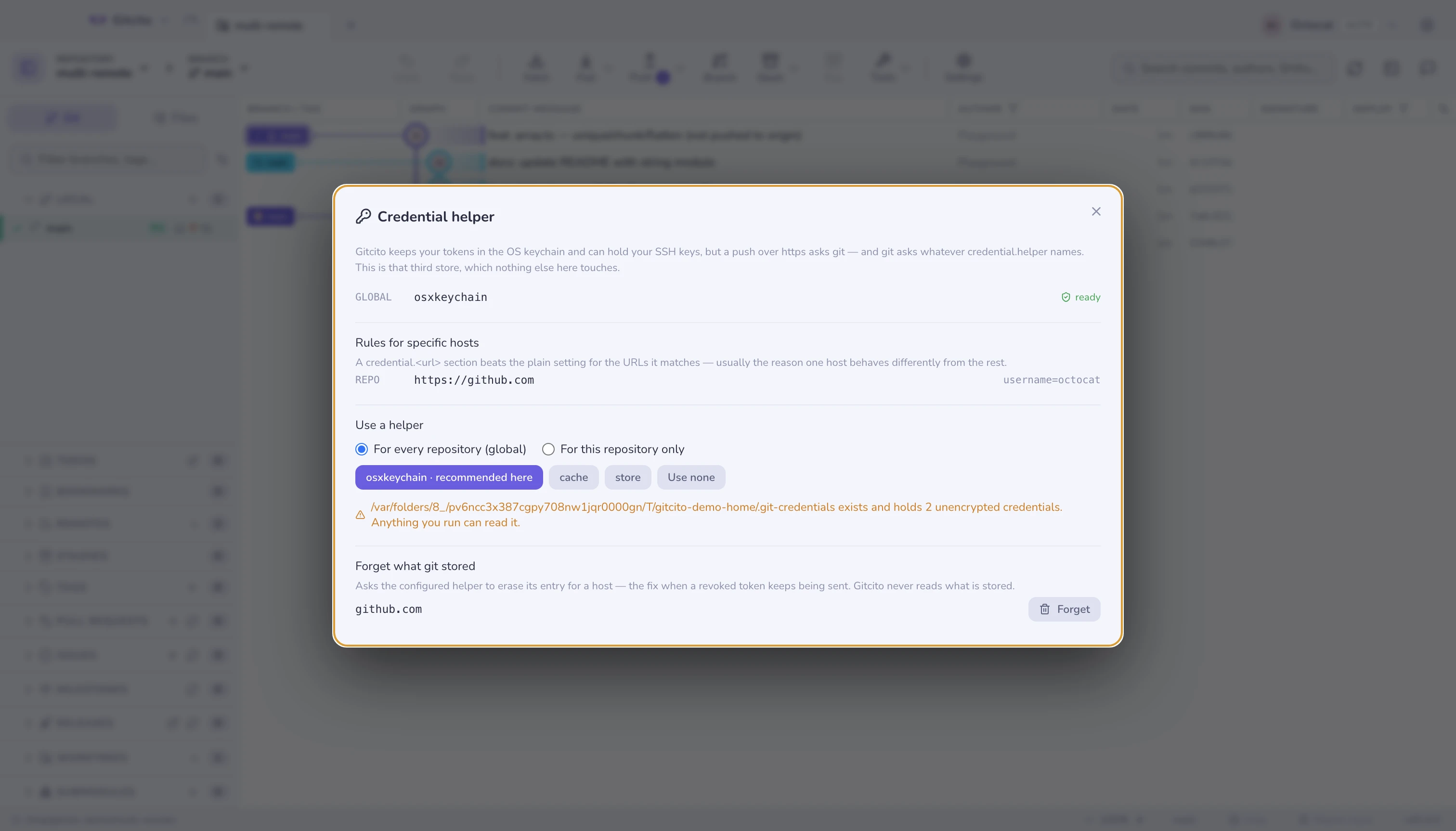
What you are looking at
Every configured credential.helper, in the scope it comes from — system,
global, then this repository. Helpers stack: git asks each in turn, and a
repository-level one does not replace a global one.
Each is checked against your machine:
| Flag | Means |
|---|---|
| ready | The helper program exists and will run |
| not installed | Configured, but the program is missing — every prompt falls through to typing it again |
| passwords in a plain file | The store helper (see below) |
Rules for specific hosts lists credential.<url>.* sections. These beat the
plain setting for the URLs they match, and are usually the answer to "why does
this one host behave differently".
Choosing one
| Helper | Where the password goes |
|---|---|
osxkeychain |
macOS Keychain — encrypted, per-user |
manager |
Git Credential Manager (Windows, cross-platform) |
wincred |
Windows Credential Manager |
libsecret |
The Linux secret service (GNOME Keyring, KWallet) |
cache |
Memory, for 15 minutes. Nothing on disk |
store |
A plain file in your home directory. Unencrypted |
Gitcito offers what is actually installed on this machine, marks the one that fits your OS, and greys out the rest.
Scope matters. For every repository writes to your global config, which is what you almost always want; for this repository only is for the odd repo that authenticates against something else.
The store helper, and ~/.git-credentials
store writes https://user:password@host lines to ~/.git-credentials, in
plain text, with no encryption of any kind. Anything that runs as you can read
it: a script, a dependency's postinstall, anything.
If that file exists, this page says so and counts the entries. It never shows them — the count is the whole point, and reading the contents to display them would be the same mistake.
If you find one and did not mean to: pick a real helper here, then delete the file and re-authenticate once.
Forgetting a stored credential
When a token is revoked or rotated, the helper keeps handing over the old one
and every push fails with a 401 that names nothing. Forget asks the
configured helper to erase its entry for that host — git credential reject,
which is git's own documented route.
Nothing is read on the way: Gitcito never calls git credential fill, the
command that would print a live password to standard output.
The next push asks you once, and the helper stores the new answer.
Limits worth knowing
- This is git's store, not Gitcito's. Changing it changes what your terminal does too — which is the point, and worth knowing before you change it.
- System-level helpers are shown, not editable. They live in a config only an administrator can write.
- Gitcito cannot list what a helper holds. No credential API exposes that without handing over the secrets, so the dialog reports configuration and erases on request, and nothing else.
- A token you gave Gitcito is separate. Revoking one does not touch the other; see security for the keychain side.