
Resolving conflicts
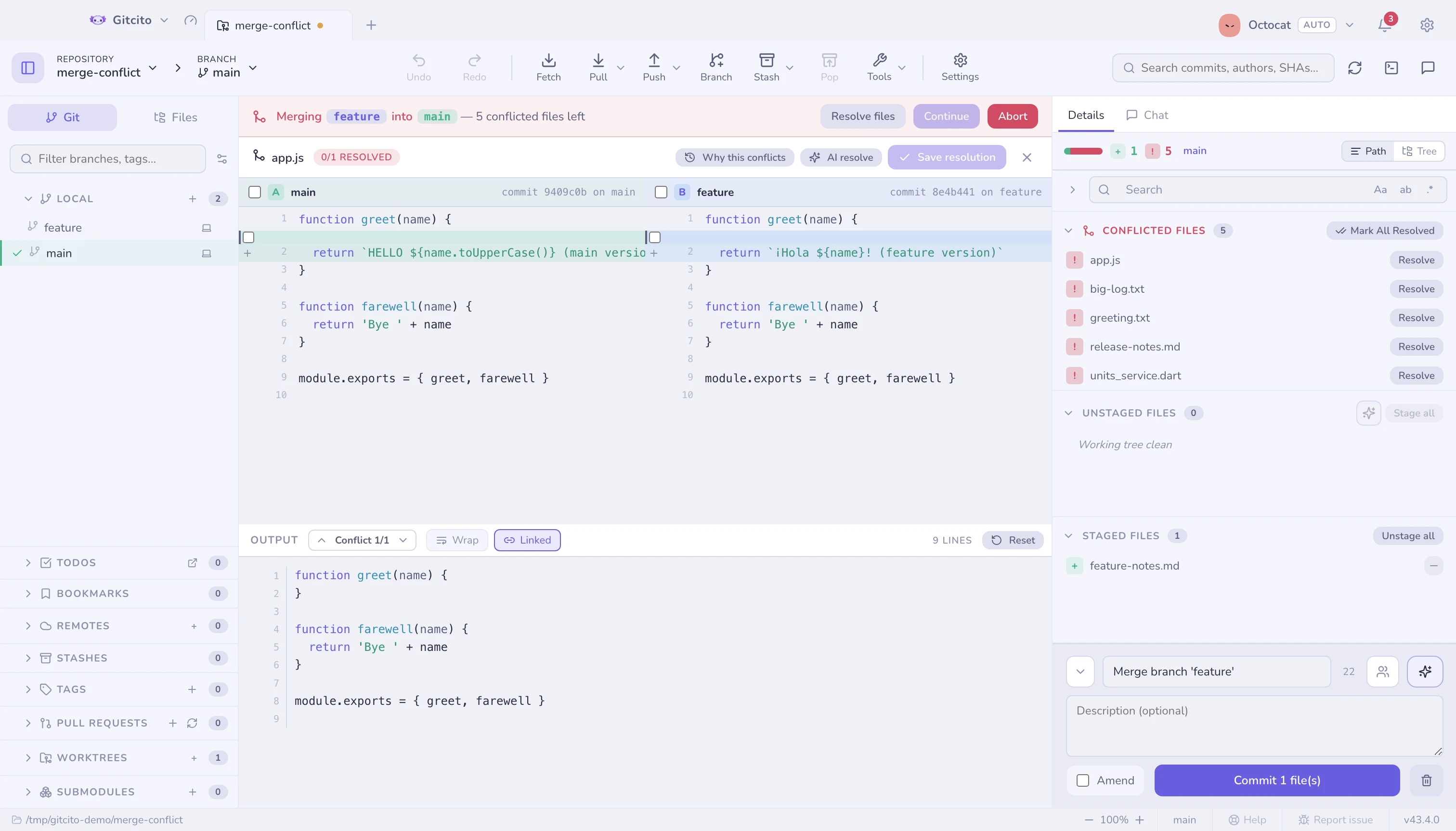
When a merge, rebase, cherry-pick or revert stops, a banner tells you what
stopped and between what — "merging feature/x into main", not just
"conflict".
Why this conflicts
Why this conflicts in the header lists, per side, the commits that touched
this file since the branches parted — git log --merge, which git has shipped
forever and nobody finds.
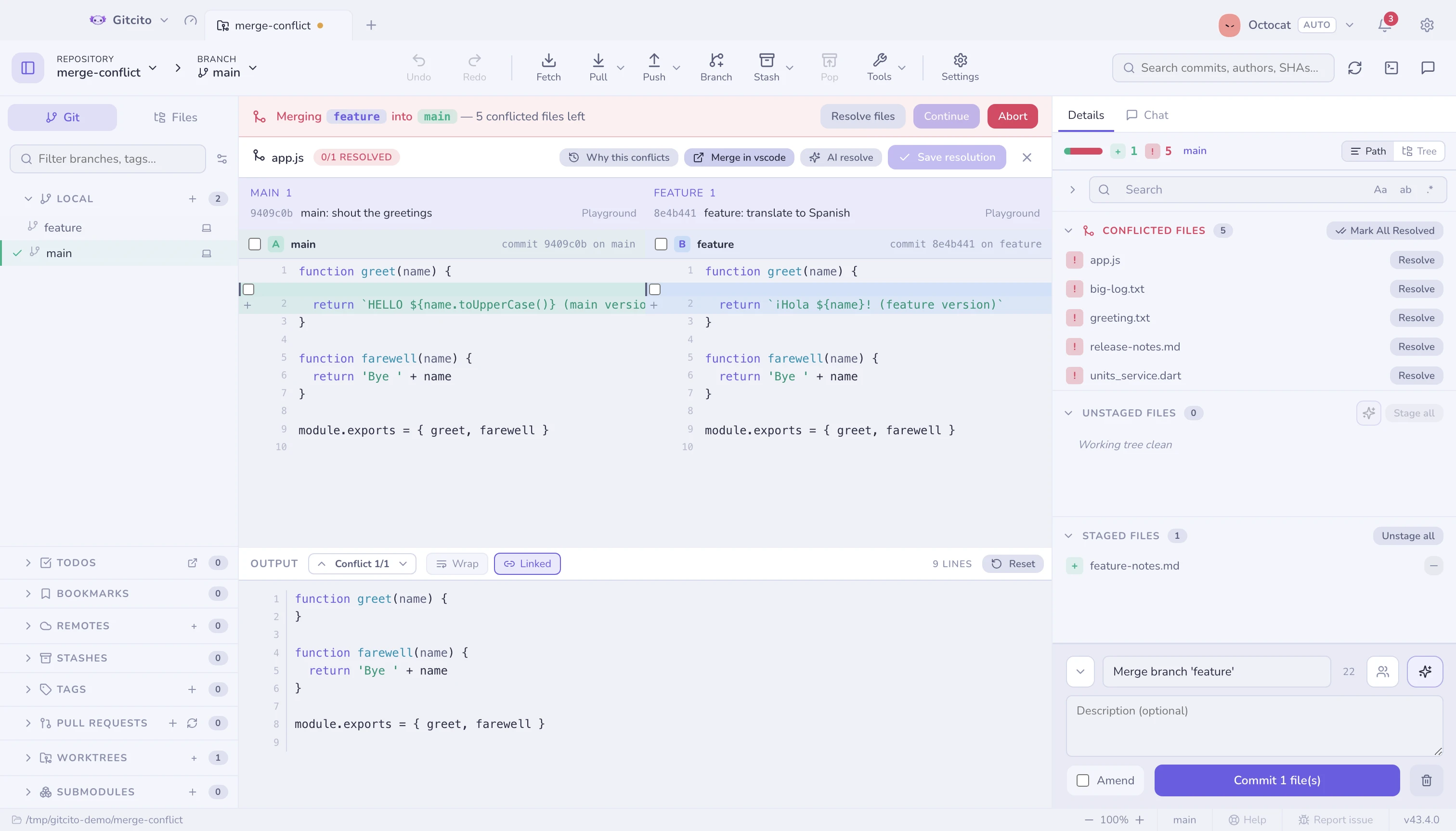
Markers say what clashes. This says who changed it and why, which is usually what actually decides the resolution. Nothing there means neither side committed a change to this exact path — the clash came from a rename or a move.
The three panes
| Pane | Is |
|---|---|
| Left | Ours — the side you were on, labelled with its commit |
| Right | Theirs — the side coming in, labelled with its commit |
| Middle | The output: editable, with line numbers, and what actually gets staged |
All three panes resize, and the output header carries two view toggles:
| Toggle | What it does |
|---|---|
| Wrap | Folds long lines inside the A and B panes instead of scrolling them. The output pane keeps one row per line — its side markers depend on that — so it always scrolls |
| Linked | Scrolls A, B and the output together, vertically and sideways. Their line counts differ, so the vertical position is matched by proportion |
Wrap starts off, Linked starts on, and both remember their state.
Getting around
Opening a file lands you on its first conflict, not at the top of the file. The ⌃ / ⌄ arrows in the output header — or Alt+↑ / Alt+↓ — step through the rest, scrolling all three panes to each one.
Picking
Per line, per chunk, or the whole side at once — and you can take both sides of a chunk when the answer is "keep both". A conflict-by-conflict navigator walks you through what is left, so you cannot accidentally leave a marker behind.
AI assist
With AI enabled, Resolve with AI proposes a merge into the output pane. It never applies anything on its own: you read it, edit it, and stage it. See AI features.
Xcode project files
project.pbxproj conflicts more than any other file in an iOS repository, and
almost never because anyone disagreed. It is one flat dictionary of objects
keyed by 24-hex ids, so adding one file writes four entries — a PBXBuildFile,
a PBXFileReference, a line in the owning group's children, a line in the
target's build phase. Two people adding a file each write eight entries that
land on the same handful of lines. Git sees a collision; there is nothing to
resolve.
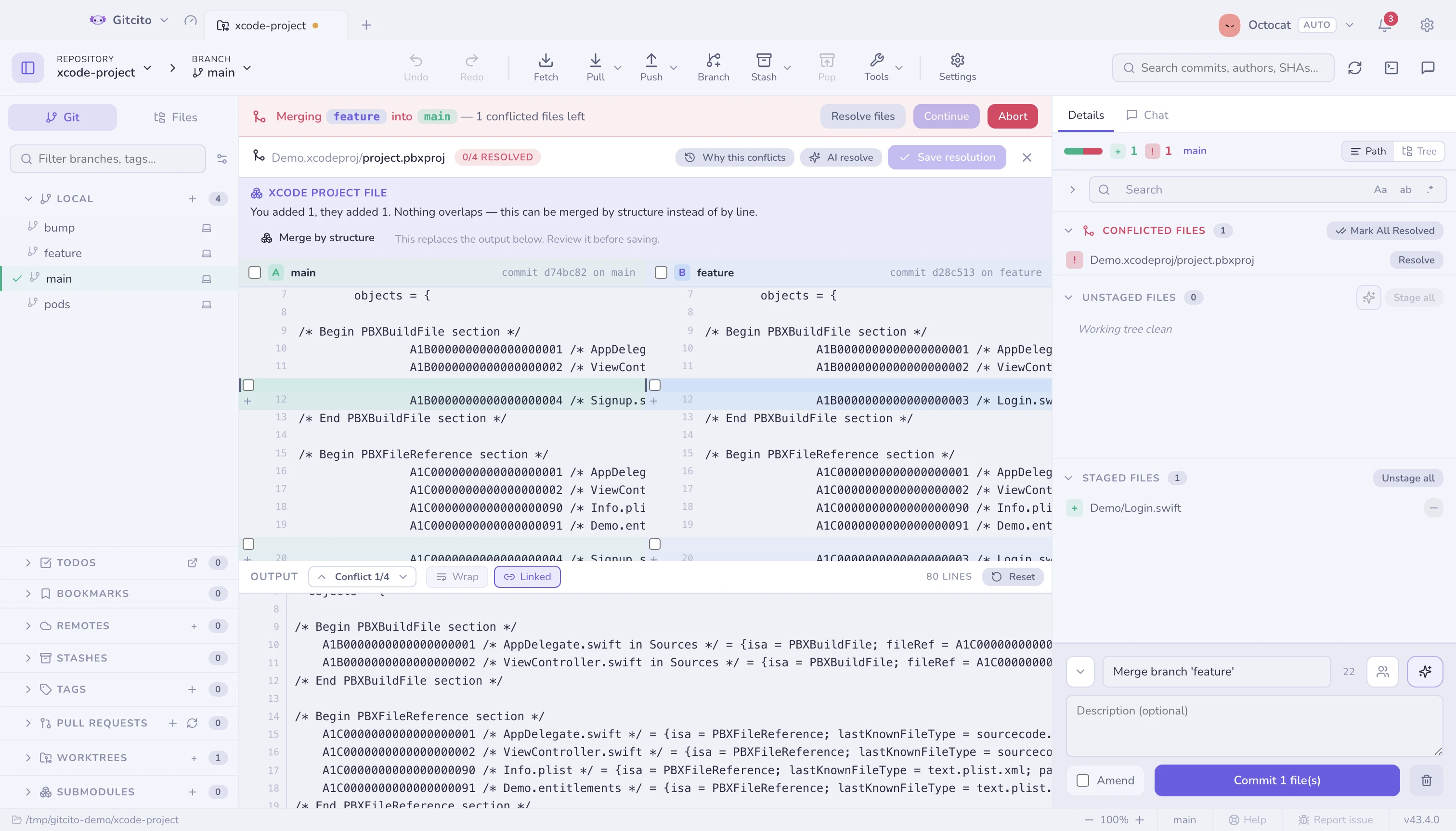
When the conflicted file is a project.pbxproj, the resolver reads all three
versions as projects rather than as text and offers to merge by structure:
match objects by id, take every addition from both sides, union the children
and files arrays, and stop at whatever genuinely diverged. The band above the
panes says what each side added and what — if anything — is left for you.
Like the AI proposal, it lands in the output pane and stages nothing. You read it before you save.
What it refuses to do
It never guesses at a setting you both moved. If you set
MARKETING_VERSION to 1.1 and they set it to 2.0, that is a decision, and
it is named in the band — the setting, your value, theirs — rather than resolved
behind your back. An object it could not settle keeps your version exactly, so
a half-applied merge never reaches disk.
It refuses the whole file if any of the three versions will not parse. A
project.pbxproj Xcode cannot open costs more than a manual merge, so anything
it cannot read with certainty stays an ordinary text conflict, and it says so.
It does not detect two ids minted for different objects. Rare, since Xcode picks ids at random — but when it happens, taking either side would silently drop somebody's file, so it is reported instead of merged.
Not merge=union
The remedy that circulates for this is *.pbxproj merge=union in
.gitattributes. Avoid it. Union works while the only changes
are independent additions, and the moment two people edit the same build setting
it emits both lines and produces a file Xcode refuses to open — at a moment when
you are least likely to be reading the diff carefully. Structural merging is the
same convenience without that failure.
Lockfiles
Podfile.lock, Package.resolved, yarn.lock and their cousins record a
dependency graph somebody's resolver already solved. Half of one solution
stitched to half of another is a graph nobody solved: it may not install, and if
it does, it installs something neither branch tested.
So when the conflicted file is a lockfile, the band names the tool that owns it, offers Keep ours and Keep theirs right there, and gives you the command that regenerates it afterwards. Taking a side is not a compromise here — it is the whole method, and the regeneration is what makes it correct.
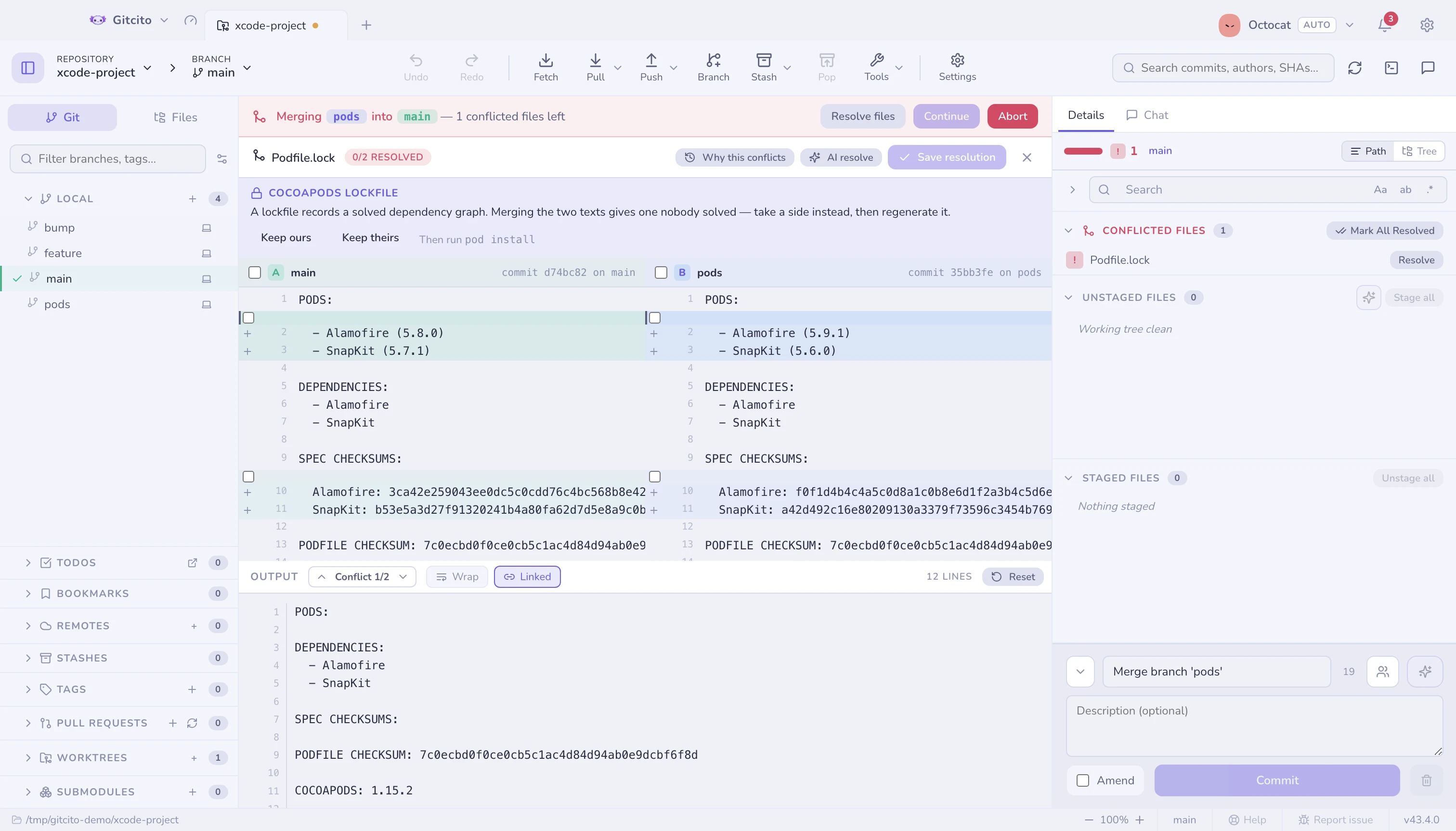
The three panes stay available, because now and then you do want to read what changed — a checksum you recognise, a version you were expecting. Editing them by hand is the thing this is trying to talk you out of.
Avoiding them in the first place
Conflict radar tells you which branches will conflict before you merge any of them.
Letting git remember (rerere)
Rebase a long-lived branch and you meet the same conflict every time. rerere
— reuse recorded resolution — is git's answer: it memorises how you settled a
conflict and replays that answer the next time the identical one appears.
Settings → General → Remember conflict resolutions. It writes
rerere.enabled to your global git config, so the command line behaves the same
way.
When git has answered for you, the resolver says so instead of showing an empty "no conflict markers" screen, and offers Forget this resolution — which drops the memory and brings the conflict back, so you can settle it differently.
Two things worth knowing:
A replayed resolution is not staged unless you turn on Stage a replayed resolution automatically. Leave that off: the point of the pause is that a memorised answer can be wrong for this particular merge, and staging without looking is how it reaches a commit.
This is why a replayed file stays in Conflicted files: git wrote the content but the index still holds it as unmerged, and only staging settles that. Stage as-is in the resolver, or Mark all resolved in the list, is what moves it.
rerere does not understand every conflict. Add/add and delete/modify conflicts get no preimage, so they always come back raw. The count in Settings is how many it actually holds, and Forget all empties it.
See also: Conflict radar · Merging & rebasing